What happens when you point a coding tool at a design problem?
lisa was built for code. It's a DAG-driven scheduler: you write tickets, it reads the dependency graph, spawns a worker agent per ticket, and walks each one through a six-phase workflow (Research → Design → Structure → Plan → Implement → Review). Its whole world is source files and commits. So we asked a slightly mischievous question: what if the tickets weren't code at all? What if we handed it two fuzzy, creative, quarterly-review design tasks — the kind you'd normally babysit an agent through for an afternoon — and just let it run? Nobody expected it to be perfect. That wasn't the point. The point was to find out what a code-shaped tool does with a design-shaped job.
The two tasks
MindShift is an AI perspective-shift app — vent a problem, pick a historical-figure "lens," get a reply in their voice, across three visual themes. We're heading into a quarterly review with App Store rollout as the north star, and two things needed doing:
A roadmap board — turn the whole backlog (tickets, features, marketing ideas) into a Figma roadmap, mirroring a reference board from another project.
An app → Figma screen inventory — audit every screen that actually ships in the code, reconcile the naming against Figma, and lay the real screens onto a Figma page as frames named to match the app. Kawaii theme first; the other two themes held for review.
Neither is code. Both are the kind of taste-and-judgment work you'd assume needs a human in the loop the whole way.
The one trick: shape the work like a graph
The only real prep was decomposition — reshaping each fat task into gather-in-parallel → converge-to-build, drawing a dependency edge only where a ticket genuinely needs a previous one's output:
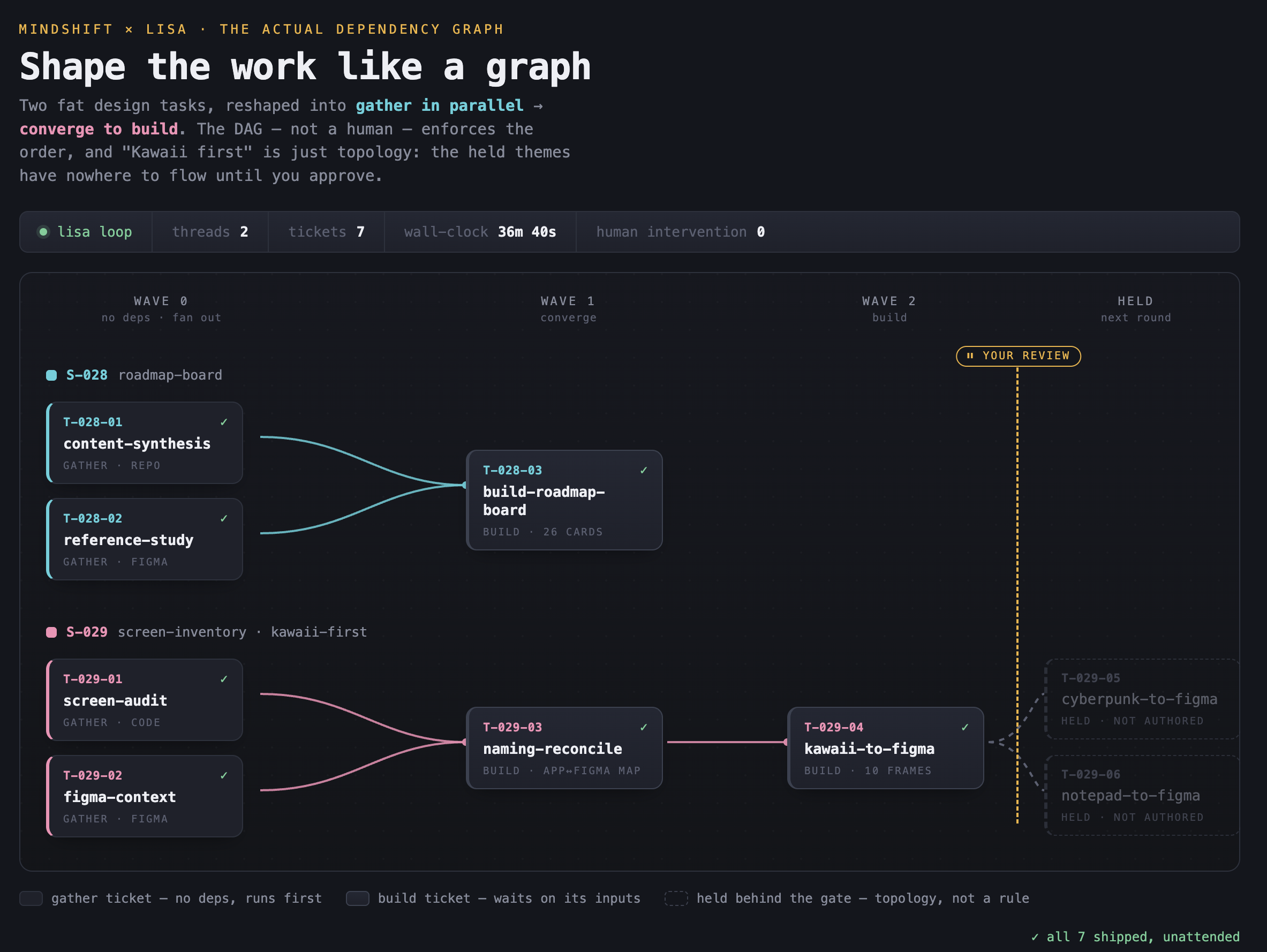
Four independent gather tickets fan out across two worker threads; the build tickets can't start until their inputs exist, so the graph — not a person — enforces the order. And "Kawaii first, then the rest" wasn't a rule we had to police: we simply didn't write the cyberpunk and notepad tickets yet, so the graph has nowhere to flow until we approve. A review gate, expressed as topology.
That authoring took about fifteen minutes. Then we hit go and walked away.
What it did in 36 minutes and 40 seconds
Start to finish — first artifact written to last — 36m 40s, two threads, zero intervention. It produced ~40 working documents and two finished Figma pages while we did other things.
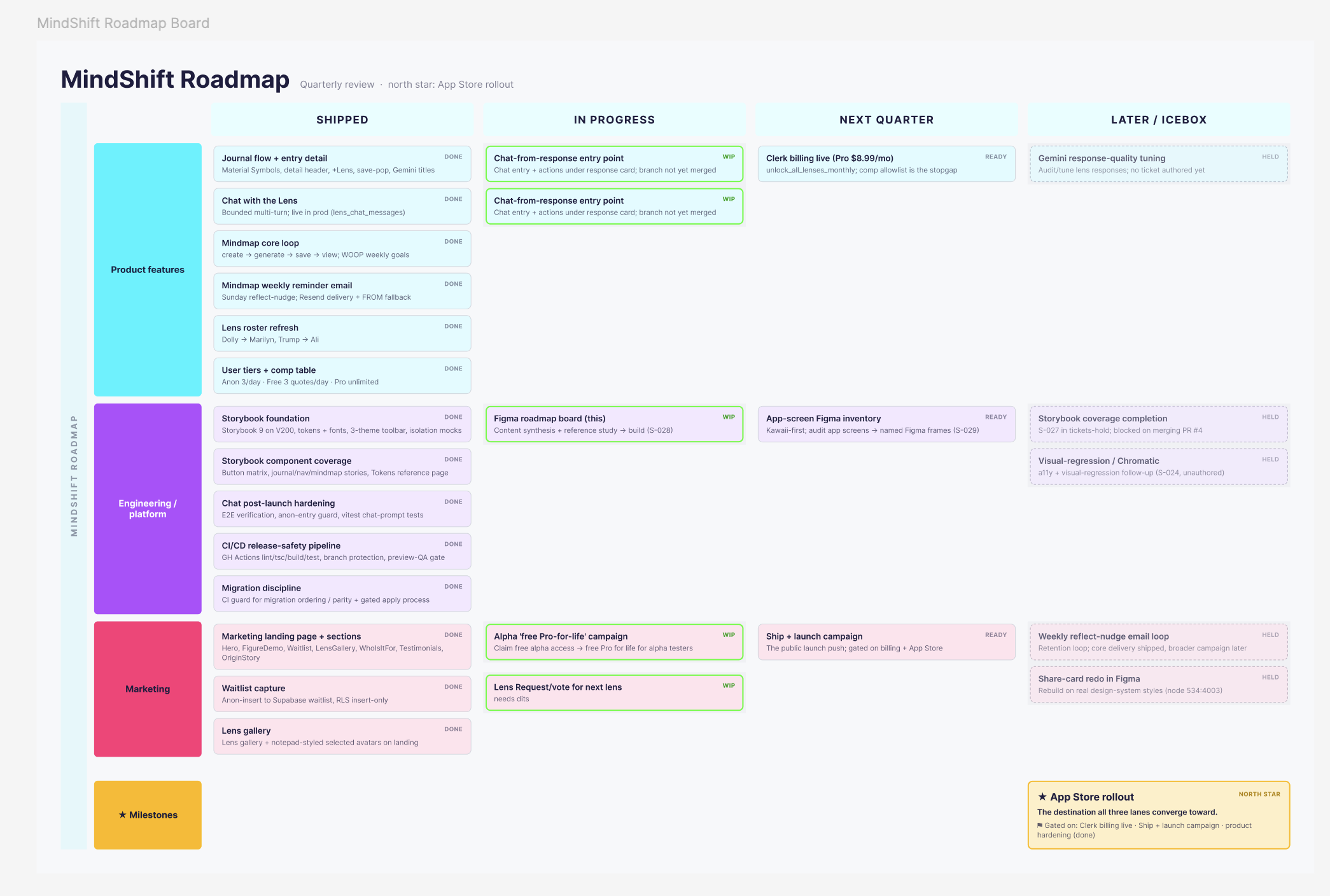
The roadmap board came out as a swimlane matrix: three lanes (Product, Engineering, Marketing) across four horizons (Shipped, In progress, Next quarter, Later), 26 cards, every single one traceable to a real backlog item — no invented filler, verified by counting cards against the source doc. App Store rollout landed as the terminal north-star card. And it didn't declare itself finished: it surfaced the board as a taste gate, flagging three reversible calls for a human — light board vs. on-brand dark, placeholder font vs. brand type, plain frames vs. a reusable component master.
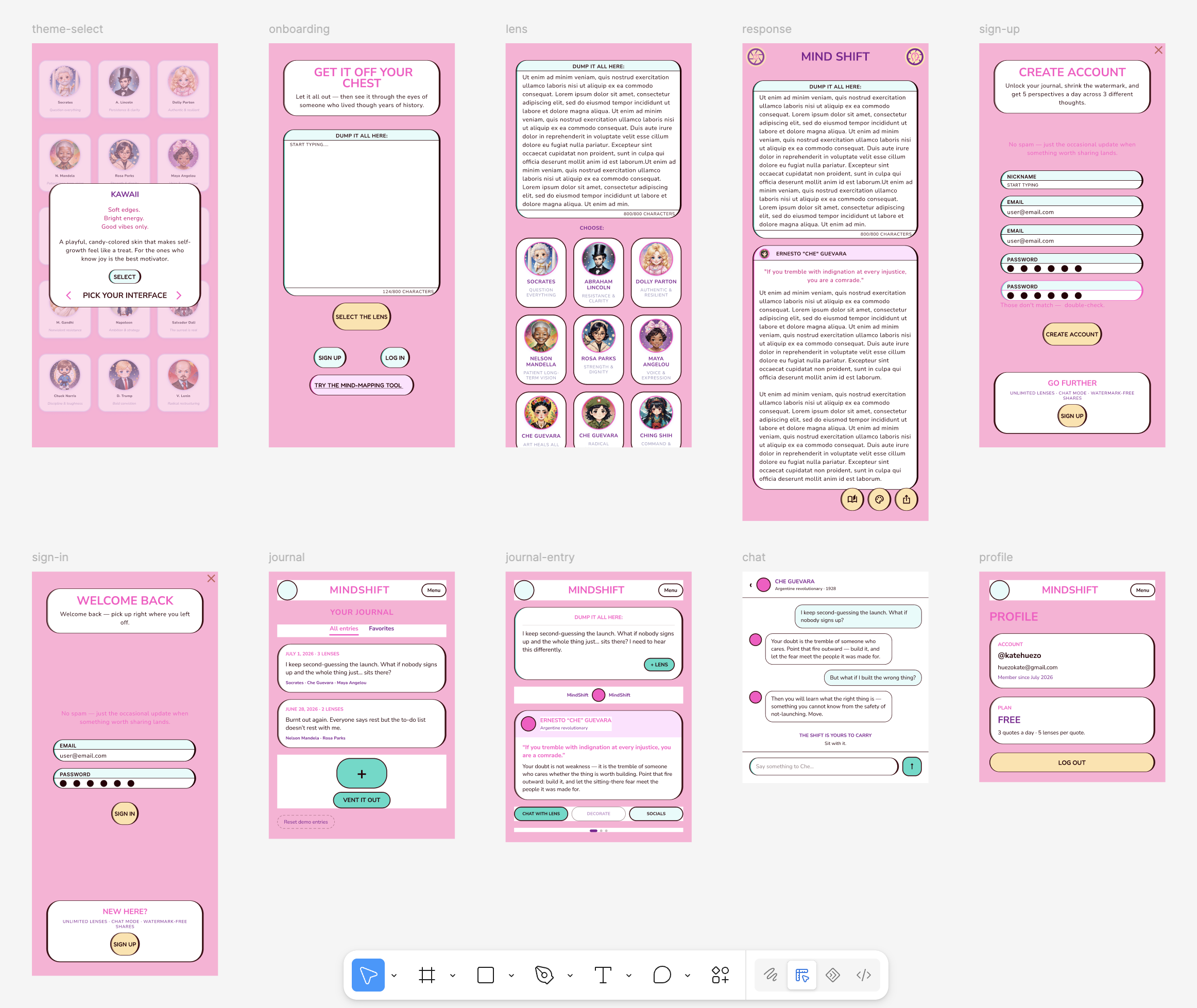
The screen inventory was the part that genuinely surprised us. Ten Figma frames, each named to match the app, five cloned from existing art and five built fresh from the shipped code. But it was the judgment that stood out:
It left the five mindmap screens out of the Kawaii batch on its own reasoning — those screens force the notepad theme on load in the real app, so a Kawaii version would depict something that never actually renders. It named them for the future notepad wave and moved on.
It caught a typo ("Lens responce" → response) and a mislabeled frame (an "Account Creation From Notepad" that was actually Kawaii) and quietly fixed both.
It flagged orphan frames with no app equivalent for a human to decide on — explicitly "do not delete" — instead of tidying them away.
It honored the gate, ending with a note asking us to approve Kawaii before it touches the other two themes, because those reuse this exact naming and layout.
That's not "an agent filled in a template." That's a tool making the small, correct calls a careful designer makes — and knowing which calls to hand back.
The take
The headline isn't that a robot built our Figma pages. It's that a tool built for code, handed a genuinely creative brief, did the project management a human would otherwise do — found the parallelism, enforced the order, deferred the taste — and turned around a roadmap and a themed screen inventory, unsupervised, in under 40 minutes. We didn't expect it to be perfect. It wasn't. It was better than "worked" — it was fun to watch, and the output is real. For fuzzy, parallelizable creative work, pointing a coding DAG at it turns out to be a pretty dope idea.
Final thoughts — from Kate, the human in the loop
Would I trust this to run my design work unsupervised? Not in a million years. Ask me again in a few years, though — the way dev is moving, I'm not betting against it.
Here's my honest read of what came back.
The roadmap is a decent snapshot of where the product stands. I wouldn't hand-maintain it — once the next round of bugs is cleaned up and features ship, it'll be easier to just regenerate a fresh one than keep this one current. (Note to self and to the intern: lean on autolayout harder. Though credit where it's due — it visibly got better at autolayout as it went.)
The screens are where it splits in two. theme-select, onboarding, lens, and response are genuinely great — basically identical to what's in prod and in my Figma, and I'm really happy with those. Then from sign-up on, it slid. That one's Clerk, and I expected the intern to copy the actual code onto the canvas — the Clerk fields, every detail, as it really ships. Instead it pulled from old Figma components, and each screen after got looser. The chat screen has nothing in common with prod; journal and journal-entry are a long way from either the code or the design.
Turns out that wasn't the intern getting lazy — it was what the tickets told it to prioritize (reuse existing Figma over tracing the code, and ten frames crammed into one pass so the last few ran on fumes). Both fixable in the decomposition, not the model. See the appendix.
So I'll keep giving the intern design tasks — it's too useful not to. Rely on it? Not yet. But "not yet" is doing a lot of work in that sentence.
(Field notes on the rough edges — where a code-brain tool showed its seams on a design job — live in the companion appendix.)
